Introduction
File Integrity Monitoring (FIM) is one of the most critical defensive controls in modern security operations. In any operating system—especially Linux production servers and critical endpoints—unauthorized changes to system binaries, administrative home directories, or configuration files frequently represent the earliest stages of an attack.
Adversaries rely on file modifications for several distinct techniques:
- Persistence: Dropping web shells, cron jobs, or modifying systemd unit files.
- Privilege Escalation: Tampering with SUID binaries or replacing shared system libraries.
- Defense Evasion: Modifying
/etc/hosts, altering/etc/resolv.conf, or clearing system binaries to disable logging. - Malware Deployment: Staging malicious payloads in directories such as
/root,/tmp, or/dev/shm.
While periodic filesystem scans (e.g., daily baseline hashing) can eventually spot modifications, an attacker can achieve their objective, execute malicious commands, and clean up their tracks long before a scheduled check runs.
Real-time File Integrity Monitoring solves this problem by hooking directly into the operating system kernel's filesystem notification system (inotify in Linux). The moment a file is created, modified, or deleted, an event is generated and forwarded to the SIEM manager in milliseconds.
In this practical guide, I will walk you through implementing real-time File Integrity Monitoring using Wazuh SIEM, writing custom server-side detection rules to prioritize critical paths like /root, simulating an unauthorized file creation, and verifying alerts in the Wazuh Dashboard.
GitHub repository: https://github.com/jaseervk/File-Integrity-Monitoring-using-WAZUH.git
Lab Architecture & Detection Pipeline
The implementation consists of a monitored Linux agent (encrypter) running the Wazuh Agent daemon and a centralized Wazuh SIEM Manager (<server_ip>) handling event ingestion, rule evaluation, and indexing.
Linux Endpoint (Wazuh Agent)
       |
       | Real-time inotify kernel notifications
       v
Wazuh syscheck Engine
       |
       | Encrypted TCP (Port 1514)
       v
Wazuh Manager (analysisd)
       |
       | Evaluates against local_rules.xml (Rule 100010 - 100022)
       v
Wazuh Indexer / Elasticsearch
       |
       v
Wazuh Dashboard (FIM Recent Events)
       |
       v
SOC Analyst Investigation
Detection Workflow
- The Wazuh Agent
syscheckmodule registers watches on designated critical directories. - An adversary or user performs a filesystem operation (e.g.,
touch /root/1.txt). - The Linux kernel notifies the Wazuh Agent instantly via the
inotifysubsystem. - The agent collects metadata (file path, modification timestamp, owner, permissions, and file hashes) and securely transmits the event to the Wazuh Manager.
- The Wazuh Manager's
analysisdengine decodes the event and compares it against both default and custom XML rules in/var/ossec/etc/rules/local_rules.xml. - High-severity alerts are indexed and populated in the Wazuh Dashboard under Integrity Monitoring.
Tools & Environment
| Component | Role in Lab | Configuration Target |
|---|---|---|
| **Wazuh Agent** | Endpoint monitoring daemon | `/var/ossec/etc/ossec.conf` |
| **Wazuh Manager** | Event correlation and alert engine | `/var/ossec/etc/rules/local_rules.xml` |
| **Linux (Ubuntu / Kali)** | Monitored endpoint (`encrypter`) | Critical paths: `/root`, `/etc`, `/usr/bin`, `/usr/sbin` |
| **Wazuh Dashboard** | SOC alert visualization & triaging | Integrity Monitoring module |
Step 1: Configure Real-Time Monitoring on the Agent
By default, Wazuh's syscheck module runs periodic scans every 12 hours (43200 seconds). To detect unauthorized tampering as it happens, we configure the agent to monitor high-risk directories in real time.
Open the agent configuration file on the monitored endpoint with administrative privileges:
sudo nano /var/ossec/etc/ossec.confScroll to the <syscheck> block. We configure general system directories (/etc, /usr/bin, /usr/sbin) along with the high-privilege administrative home directory (/root) using the realtime="yes" attribute:
<ossec_config>

  <client>
    <server>
      <address>server_ip</address>
      <port>1514</port>
      <protocol>tcp</proto1col>
    </server>
  </client>

  <syscheck>
    <frequency>43200</frequency>
    <scan_on_start>yes</scan_on_start>

    <directories check_all="yes" realtime="yes" change_report="yes">/etc</directories>
    <directories check_all="yes" realtime="yes" change_report="yes">/usr/bin</directories>
    <directories check_all="yes" realtime="yes" change_report="yes">/usr/sbin</directories>
    <directories check_all="yes" realtime="yes" change_report="yes">/root</directories>
  </syscheck>

</ossec_config>
Parameter Breakdown
check_all="yes": Instructs the agent to check all standard file attributes including MD5, SHA1, and SHA256 checksums, file size, permissions, owner, and group.realtime="yes": Enables the Linux kernelinotifysubsystem. The agent receives immediate interrupt-driven notifications on filesystem events rather than waiting for scheduled poll intervals.change_report="yes": Generates text-based diffs for modified files, allowing analysts to see the exact lines added, edited, or removed.scan_on_start="yes": Forces an immediate baseline scan as soon as the agent service starts up.
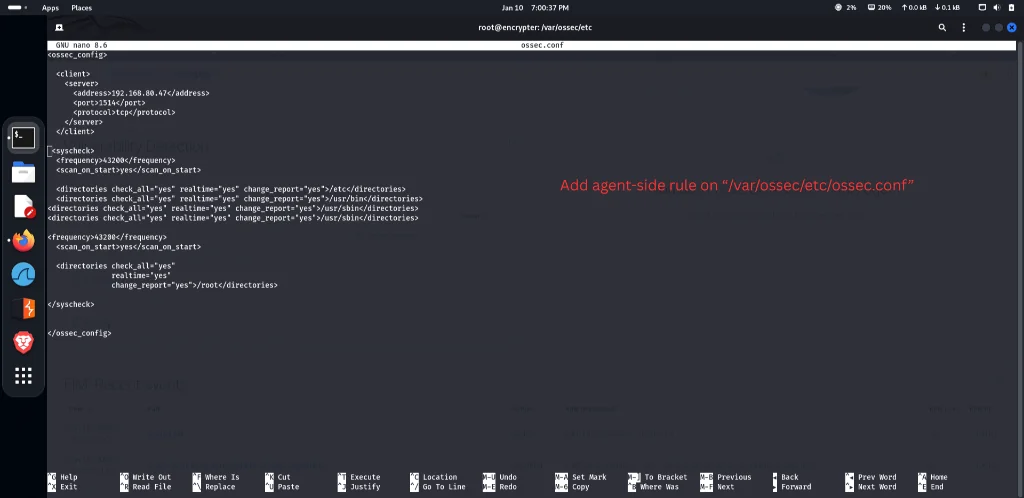
Save and exit the file, then restart the Wazuh Agent daemon to apply the configuration:
sudo systemctl restart wazuh-agent
sudo systemctl status wazuh-agent
Verify that the service is running and active without errors.
Step 2: Configure Custom Server-Side Alert Rules
Out of the box, default Wazuh FIM rules (Rule IDs 550, 553, and 554) classify file changes with moderate severity levels (typically level 7). In a production SOC environment, changes occurring in administrative directories such as /root represent high-risk activity that requires higher severity classification and immediate analyst attention.
To achieve this, we define custom server-side rules in /var/ossec/etc/rules/local_rules.xml on the Wazuh Manager.
Open the custom rules configuration file on the manager:
sudo nano /var/ossec/etc/rules/local_rules.xmlAdd the following rule groups to define custom FIM alerting and escalate changes in /root:
<group name="syscheck">

  <!-- File created in any monitored directory -->
  <rule id="100010" level="10">
    <if_sid>554</if_sid>
    <description>FIM: File created in $(directory) - $(file)</description>
  </rule>

  <!-- File deleted from any monitored directory -->
  <rule id="100011" level="10">
    <if_sid>553</if_sid>
    <description>FIM: File deleted from $(directory) - $(file)</description>
  </rule>

  <!-- File modified in any monitored directory -->
  <rule id="100012" level="8">
    <if_sid>550</if_sid>
    <description>FIM: File modified in $(directory) - $(file)</description>
  </rule>

</group>

<group name="syscheck,root_monitoring">

  <!-- Critical file created in /root -->
  <rule id="100020" level="12">
    <if_sid>554</if_sid>
    <match>^/root/</match>
    <description>CRITICAL FIM: File created in /root - $(file)</description>
  </rule>

  <!-- Critical file deleted from /root -->
  <rule id="100021" level="12">
    <if_sid>553</if_sid>
    <match>^/root/</match>
    <description>CRITICAL FIM: File deleted from /root - $(file)</description>
  </rule>

  <!-- Critical file modified in /root -->
  <rule id="100022" level="10">
    <if_sid>550</if_sid>
    <match>^/root/</match>
    <description>FIM: File modified in /root - $(file)</description>
  </rule>

</group>
Rule Logic Explained
if_sidInheritance:554corresponds to the default Wazuh rule: File added to the system.553corresponds to: File deleted from the system.550corresponds to: Integrity checksum changed. Our custom rules trigger whenever the underlying engine detects these core events.
- Dynamic Variables (
$(directory),$(file)): Injects the exact file name and directory path into the alert description, making dashboards and notification emails instantly actionable. - Regex Pattern Matching (
<match>^/root/</match>): Rules100020through100022specifically match files inside/root/. - Severity Escalation (Level 12): Creation or deletion of files directly in
/rootis escalated to Level 12 (Critical), ensuring it triggers high-priority SOC alerts.
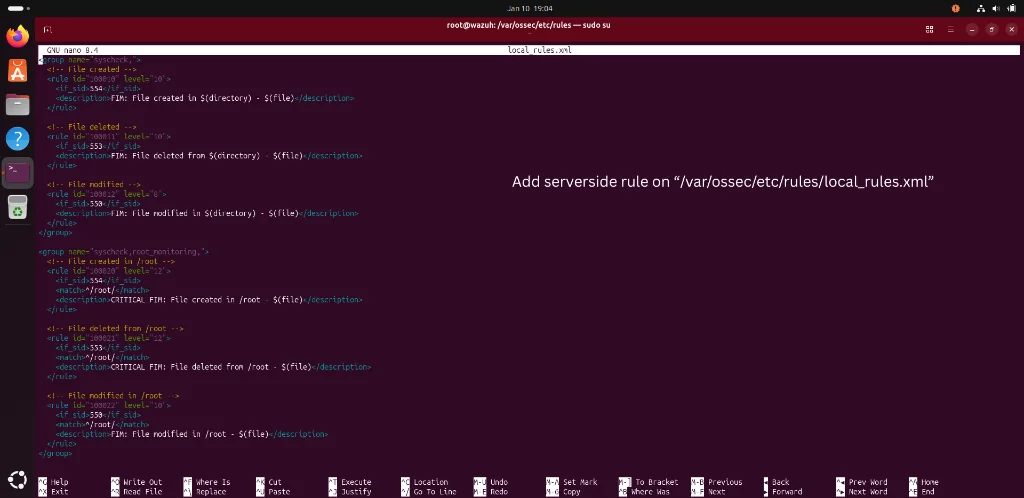
Save the file and restart the Wazuh Manager service to load the new ruleset:
sudo systemctl restart wazuh-manager
sudo systemctl status wazuh-manager
Step 3: Attack Simulation
To validate that real-time monitoring and rule evaluation work as expected, we simulate an adversary activity on the monitored endpoint.
Log into the monitored agent machine (encrypter) via SSH or direct terminal access, elevate privileges, and create a new file in /root:
sudo -i
cd /
cd root
touch 1.txt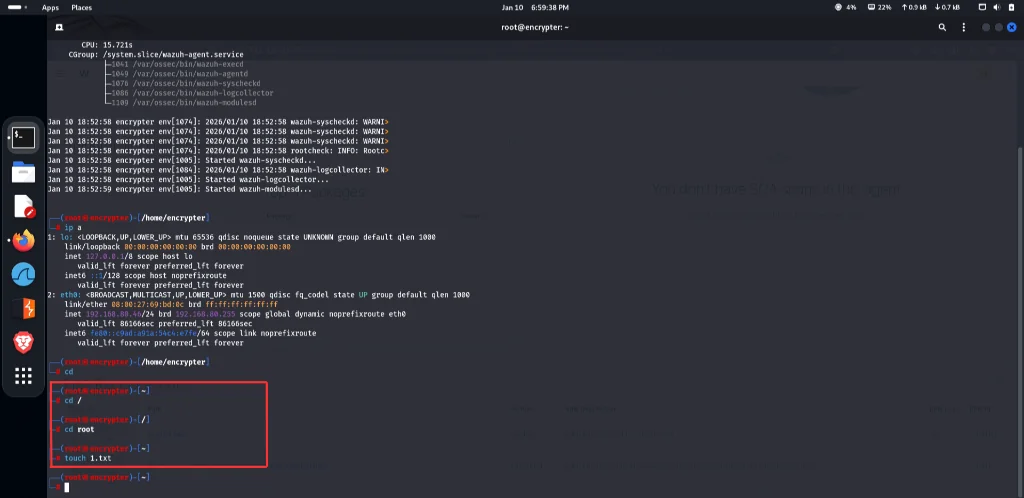
Behind the scenes:
- The kernel generates an
IN_CREATEinotify event. - The Wazuh Agent captures the event instantly and calculates cryptographic hashes for
/root/1.txt. - The event payload is dispatched across TCP port 1514 to the Wazuh Manager.
- The manager matches rule
100010and rule100020.
Step 4: Verify Alerts in the Wazuh Dashboard
Now switch to the Wazuh Dashboard web interface:
- Open your browser and navigate to your Wazuh Dashboard URL (
https://<server_ip>). - Navigate to Endpoints Summary and select the monitored agent (
002 - encrypter). - Scroll down to the FIM: Recent events panel or open the Integrity Monitoring module.
Under FIM: Recent events, the newly generated event is clearly displayed:
| Time | Path | Action | Rule Description | Rule Level | Rule ID |
|---|---|---|---|---|---|
| **Jan 10, 2026 @ 18:59:12.008** | `/root/1.txt` | `added` | **FIM: File created in - /root/1.txt** | `10` | `100010` |
| **Jan 10, 2026 @ 18:57:05.174** | `/root/.local/state/wireplumber/stream-properties` | `modified` | **FIM: File modified in - ...** | `8` | `100012` |
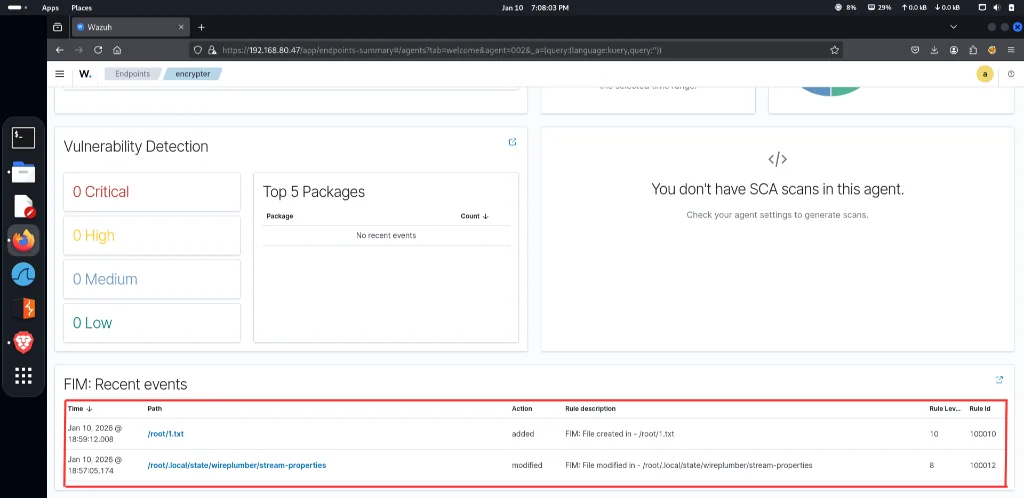
Key Event Attributes Analyzed by the SOC
- Timestamp: Exact time the change occurred on the endpoint (
18:59:12.008). - Path: The target filesystem entity (
/root/1.txt). - Action: Categorized as
added, distinguishing new file drops from edits or deletions. - Rule ID & Level: Rule
100010triggered at Level10, confirming that our customlocal_rules.xmllogic properly overrode standard lower-level alerts.
Clicking on the event record reveals full metadata, including the SHA256 file checksum, inode number, user ownership, and file permission bits (-rw-r--r--).
Tuning FIM & Avoiding Alert Fatigue in Production
While real-time FIM is extremely powerful, un-tuned deployments can overwhelm a SOC with false positives. Common noisy sources include dynamically generated cache files, log files, temporary lock files, and automatic updates.
1. Ignore Unnecessary Files and Patterns
Use <ignore> or <ignore type="sregex"> within the <syscheck> block in ossec.conf to exclude volatile runtime directories and files:
<syscheck>
  <!-- Ignore log files and socket paths -->
  <ignore>/etc/mtab</ignore>
  <ignore>/etc/hosts.deny</ignore>
  <ignore type="sregex">\.log$</ignore>
  <ignore type="sregex">\.swp$</ignore>
</syscheck>
2. Enable Who-Data Auditing
Standard FIM identifies what changed, but in a forensic investigation, you also need to know who changed it. On supported Linux distributions, you can enable who-data:
<directories check_all="yes" realtime="yes" who-data="yes">/root</directories>Who-data leverages the Linux Audit Framework (auditd) to record the exact User ID (uid), effective User ID (euid), process ID (pid), and process binary name (such as /usr/bin/python3 or /usr/bin/curl) responsible for writing the file.
3. Automated Threat Intelligence Integration
FIM events can serve as the launchpad for automated response workflows. In my companion project, Automating Malware Detection with Wazuh and VirusTotal, newly created files trigger an automated API query against VirusTotal to determine if the dropped binary is a known malicious tool.
Conclusion
Real-time File Integrity Monitoring is an indispensable layer of defense in depth. By configuring Wazuh to monitor high-risk directories with realtime="yes", authoring custom detection rules to escalate changes in administrative paths like /root, and validating alerts through simulated attacks, security teams can detect unauthorized activity within seconds of occurrence.