From File Integrity Monitoring to Automated Threat Intelligence
A file appearing on a Linux endpoint is not automatically malicious.
It could be a legitimate application update, a configuration change, a script created by an administrator, or something much more suspicious.
The challenge for a SOC analyst is determining which events deserve investigation.
During one of my SOC projects, I worked on a simple way to automate the first stage of that investigation by integrating Wazuh SIEM with VirusTotal.
The idea was straightforward:
Detect a new file on an endpoint, obtain its hash, check that hash against VirusTotal, and bring the threat-intelligence result back into Wazuh.
The project combines File Integrity Monitoring (FIM) with external threat intelligence to make file-related alerts more useful for security monitoring.
GitHub repository: https://github.com/jaseervk/Wazuh-SIEM-VirusTotal-Automated-Malware-Detection.git
What I Wanted to Achieve
In a normal SOC workflow, an analyst may receive an alert indicating that a file was created or modified.
The analyst then has to manually investigate the file:
- Identify the file.
- Calculate its hash.
- Search the hash in VirusTotal.
- Review the detection results.
- Decide whether further investigation is required.
Doing this manually for every file event is inefficient.
I wanted to automate the enrichment step.
The workflow I implemented was:
Linux Endpoint
      |
      v
Wazuh Agent
      |
      | File Integrity Monitoring
      v
Wazuh Manager
      |
      | File hash
      v
VirusTotal API
      |
      | Threat intelligence
      v
Wazuh Alert
      |
      v
SOC Analyst
The repository describes the same basic workflow: the Wazuh agent detects a new file, the manager extracts the file information and queries VirusTotal, and an alert is generated when the file is flagged.
Technologies Used
- Wazuh SIEM
- Wazuh Agent
- Wazuh Manager
- File Integrity Monitoring (FIM)
- VirusTotal API
- Linux
- XML-based Wazuh configuration
- EICAR test file
Lab Architecture
The project uses a Linux endpoint running the Wazuh agent and a Wazuh manager responsible for processing the events.
The supporting FIM project uses this general architecture:
Linux Endpoint
      |
Wazuh Agent
      |
Wazuh Manager
      |
Elasticsearch
      |
Wazuh Dashboard
For this project, the important part is what happens after the FIM event reaches the manager:
FIM Event
   |
   v
VirusTotal Integration
   |
   v
Threat Intelligence
   |
   v
Security Alert
Step 1: Configure Wazuh File Integrity Monitoring
Before integrating VirusTotal, the Wazuh agent must be able to detect filesystem changes.
The VirusTotal project explicitly refers to a separate FIM project for this configuration.
The agent configuration used in the supporting FIM project contains:
<ossec_config>

  <client>
    <server>
      <address>server_ip</address>
      <port>1514</port>
      <protocol>tcp</protocol>
    </server>
  </client>

  <syscheck>
    <frequency>43200</frequency>
    <scan_on_start>yes</scan_on_start>

    <directories check_all="yes" realtime="yes" change_report="yes">/etc</directories>
    <directories check_all="yes" realtime="yes" change_report="yes">/usr/bin</directories>
    <directories check_all="yes" realtime="yes" change_report="yes">/usr/sbin</directories>
    <directories check_all="yes" realtime="yes" change_report="yes">/root</directories>
  </syscheck>

</ossec_config>
This configuration monitors several important Linux directories, including /root, using real-time FIM.
The critical line for this project is:
<directories check_all="yes" realtime="yes" change_report="yes">/root</directories>This is important because the test file will be created inside /root.
realtime="yes" enables real-time monitoring for directories on Linux.
Step 2: Edit the Wazuh Agent Configuration
On the Linux endpoint:
sudo nano /var/ossec/etc/ossec.confAdd or update the <syscheck> section with the directories you want to monitor.
For this lab, the important entry is:
<syscheck>
    <frequency>43200</frequency>
    <scan_on_start>yes</scan_on_start>

    <directories check_all="yes" realtime="yes" change_report="yes">/root</directories>
</syscheck>
The project used /root because the EICAR test file was later created there.
Step 3: Restart the Wazuh Agent
After changing the agent configuration, restart the Wazuh agent:
sudo systemctl restart wazuh-agentThe current Wazuh documentation also recommends restarting the agent after changing FIM configuration.
You can verify that the service is running with:
sudo systemctl status wazuh-agentStep 4: Obtain a VirusTotal API Key
The next component is VirusTotal.
You need a VirusTotal API key to allow the Wazuh manager to query VirusTotal.
Important
Do not publish your real API key to GitHub.
Use a placeholder such as:
YOUR_VIRUSTOTAL_API_KEYwhen documenting the project.
Step 5: Configure VirusTotal on the Wazuh Manager
On the Wazuh manager:
sudo nano /var/ossec/etc/ossec.confThe configuration used in my project was:
<integration>
  <name>virustotal</name>
  <api_key>YOUR_VIRUSTOTAL_API_KEY</api_key>
  <group>syscheck</group>
  <alert_format>json</alert_format>
</integration>
The important settings are:
<name>virustotal</name>This tells Wazuh to use the VirusTotal integration.
<api_key>YOUR_VIRUSTOTAL_API_KEY</api_key>This authenticates the request to VirusTotal.
<group>syscheck</group>This associates the integration with File Integrity Monitoring events.
<alert_format>json</alert_format>This makes the event available in JSON format for processing.
Step 6: Restart the Wazuh Manager
After saving the manager configuration:
sudo systemctl restart wazuh-managerThen check the service:
sudo systemctl status wazuh-managerAt this point, the main integration path is configured:
Wazuh Agent
     |
     | FIM Event
     v
Wazuh Manager
     |
     | syscheck
     v
VirusTotal Integration
Step 7: Create a Test File
For safe testing, I used the EICAR test file rather than real malware.
The EICAR file is specifically intended for testing antivirus and security controls without using actual malicious software.
curl -Lo /root/eicar.com.txt https://secure.eicar.org/eicar.com.txt
ls -lah /root/eicar.com.txt
At this point, a new file has appeared in /root.
That should trigger the FIM mechanism.
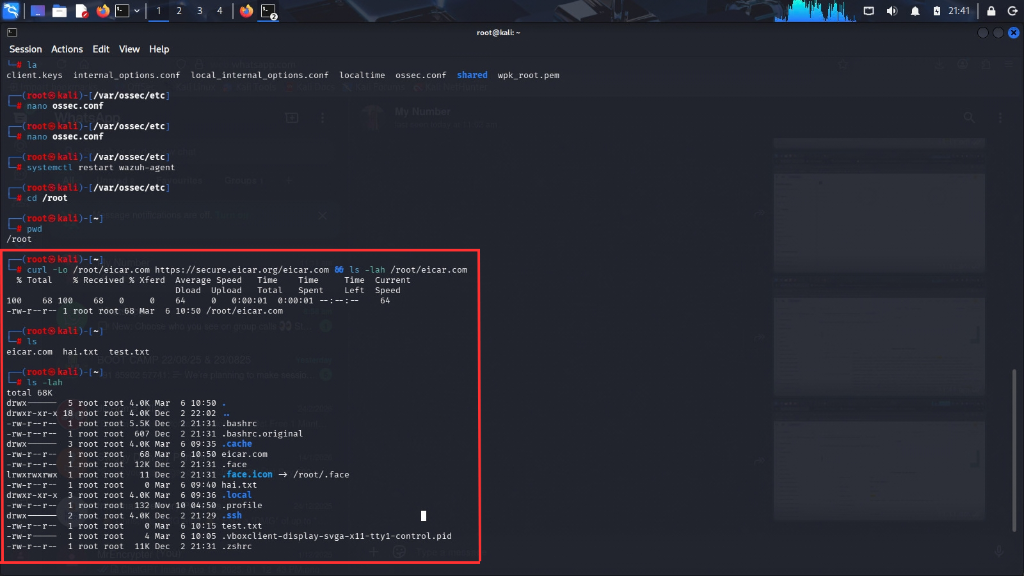
It shows the initial event that starts the entire detection chain. The project is not beginning with VirusTotal; it begins with activity on the endpoint.
Step 8: Wazuh FIM Detects the File
Once the EICAR file is created, Wazuh's FIM component detects the new file.
This is the first stage of the automated detection process.
Conceptually:
File Created
     |
     v
Wazuh FIM
     |
     v
syscheck Event
This is why the FIM configuration is so important.
Without the initial FIM event, the VirusTotal enrichment step would never be triggered.
Step 9: VirusTotal Enrichment
After the syscheck event reaches the Wazuh manager, the VirusTotal integration can process the event.
The project was designed so that Wazuh can automatically obtain file/hash information and query VirusTotal instead of requiring the analyst to perform the lookup manually.
The conceptual workflow is:
syscheck event
      |
      v
File information
      |
      v
File hash
      |
      v
VirusTotal lookup
      |
      v
Threat intelligence result
This is the main value of the integration.
The original FIM event provides the evidence that a file changed.
VirusTotal provides additional reputation information.
Step 10: View the Enriched Event
Once VirusTotal returns information, the resulting event contains additional fields related to the file and its reputation.
These can include information such as:
- File path
- File hash
- Detection information
- VirusTotal result
- Related event data
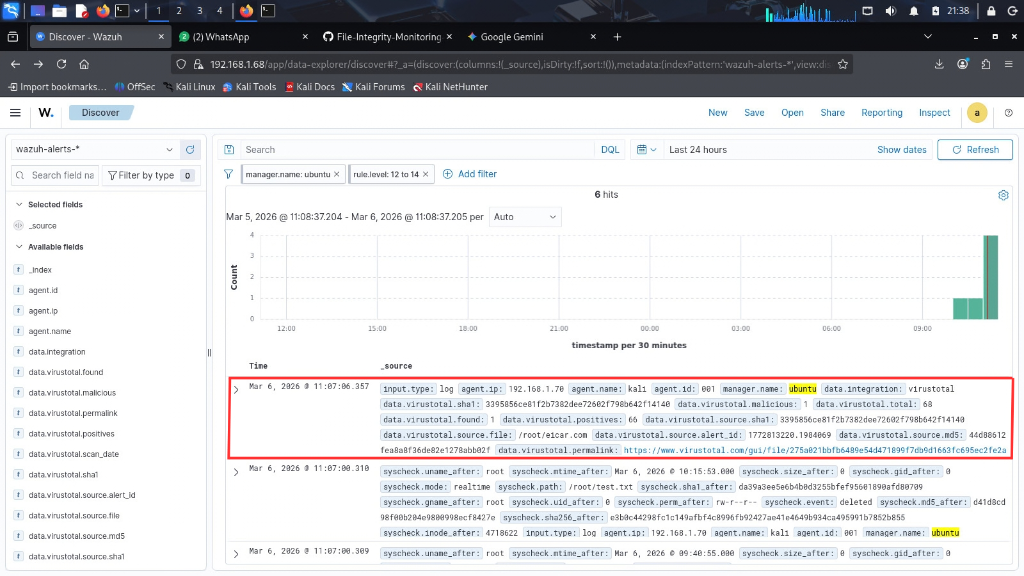
This screenshot demonstrates the transition from a simple FIM event to an event containing additional threat-intelligence context.
Step 11: Review the Security Alert
The final step is viewing the resulting alert in Wazuh.
Instead of manually opening VirusTotal and searching for the file hash, the detection result is available as part of the Wazuh workflow.
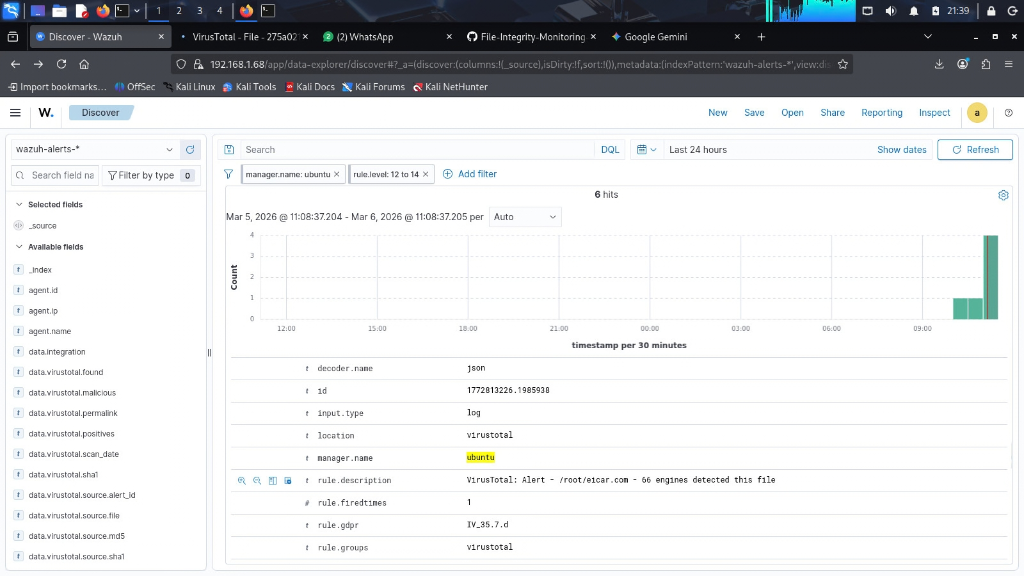
This is the most important screenshot from a SOC perspective because it shows the final outcome of the automation.
The flow has now become:
File Created
     ↓
FIM Detects File
     ↓
Wazuh Processes Event
     ↓
VirusTotal Lookup
     ↓
Threat Intelligence Result
     ↓
Wazuh Security Alert
Optional: Custom FIM Detection Rules
In my supporting FIM project, I also created custom Wazuh rules to make file creation, deletion, and modification events easier to identify.
For example:
<group name="syscheck">

  <!-- File created -->
  <rule id="100010" level="10">
    <if_sid>554</if_sid>
    <description>FIM: File created in $(directory) - $(file)</description>
  </rule>

  <!-- File deleted -->
  <rule id="100011" level="10">
    <if_sid>553</if_sid>
    <description>FIM: File deleted from $(directory) - $(file)</description>
  </rule>

  <!-- File modified -->
  <rule id="100012" level="8">
    <if_sid>550</if_sid>
    <description>FIM: File modified in $(directory) - $(file)</description>
  </rule>

</group>
These rules are from the separate FIM project referenced by the VirusTotal repository.
There are also higher-severity rules for file activity inside /root:
<group name="syscheck,root_monitoring">

  <rule id="100020" level="12">
    <if_sid>554</if_sid>
    <match>/root/</match>
    <description>CRITICAL FIM: File created in /root - $(file)</description>
  </rule>

  <rule id="100021" level="12">
    <if_sid>553</if_sid>
    <match>/root/</match>
    <description>CRITICAL FIM: File deleted from /root - $(file)</description>
  </rule>

  <rule id="100022" level="10">
    <if_sid>550</if_sid>
    <match>/root/</match>
    <description>FIM: File modified in /root - $(file)</description>
  </rule>

</group>
These custom rules are not the core requirement for the VirusTotal integration. They are an additional detection-engineering layer from my FIM project.
Understanding the Project From a SOC Perspective
The most important lesson from this project is that the individual tools are not the main story.
Wazuh alone can detect file changes.
VirusTotal alone can provide file reputation.
The useful part is connecting them.
Without automation
Wazuh Alert
     ↓
Analyst copies hash
     ↓
Opens VirusTotal
     ↓
Searches hash
     ↓
Reviews detections
     ↓
Makes a decision
With the integration
Wazuh Alert
     ↓
Hash / File Information
     ↓
VirusTotal API
     ↓
Enriched Wazuh Alert
     ↓
Analyst Investigation
The analyst can therefore spend more time on investigation and less time on repetitive enrichment.
What I Learned
This project helped me connect several SOC concepts together.
1. File Integrity Monitoring
I learned how filesystem activity can be turned into security events.
FIM is especially useful for monitoring important directories where unauthorized changes could indicate malware, persistence, or other suspicious activity. Wazuh supports real-time monitoring for configured directories.
2. Threat Intelligence
VirusTotal adds external reputation data to endpoint events.
Instead of looking only at the fact that a file was created, the analyst can also consider whether the file is already known to security engines.
3. SIEM Integration
The project demonstrated how a SIEM can consume external security intelligence and use it to enrich alerts.
4. Security Automation
One of the most important lessons was that automation does not always require a complicated platform.
A relatively simple pipeline can provide meaningful value:
Detect → Enrich → AlertImportant Security Considerations
There are several things I would not copy directly into a production environment.
Protect the API Key
Never commit this:
<api_key>REAL_API_KEY</api_key>to a public repository.
Use:
<api_key>YOUR_VIRUSTOTAL_API_KEY</api_key>in documentation and keep the actual credential protected.
Monitor Selective Directories
Monitoring an entire filesystem can generate unnecessary events and consume resources.
A better production strategy is to identify directories where malicious file activity would be particularly important.
Validate Automated Response
A VirusTotal result should not automatically mean that the endpoint must be isolated.
Automated containment should be based on appropriate confidence and business context.
Final Architecture
The final implementation can be summarized as:
             LINUX ENDPOINT
                  |
                  |
             Wazuh Agent
                  |
            File Integrity
             Monitoring
                  |
                  v
            Wazuh Manager
                  |
                  |
            Syscheck Event
                  |
                  v
          VirusTotal Integration
                  |
                  v
            VirusTotal API
                  |
                  v
         Threat Intelligence
                  |
                  v
            Wazuh Alert
                  |
                  v
             SOC Analyst
This project started with a simple question:
Can I automatically determine whether a newly created file is suspicious instead of manually checking every file hash?
By combining Wazuh File Integrity Monitoring with VirusTotal, I created a workflow that automatically enriches endpoint file events with external threat intelligence.
For me, the biggest takeaway was not simply learning how to configure VirusTotal in Wazuh.
It was understanding the broader SOC principle:
A detection becomes much more useful when it is automatically enriched with the context required for investigation.
Project Resources
- GitHub: https://github.com/jaseervk/Wazuh-SIEM-VirusTotal-Automated-Malware-Detection.git
- FIM Repository: https://github.com/jaseervk/File-Integrity-Monitoring-using-WAZUH.git
Main Technologies: Wazuh · VirusTotal API · FIM · SIEM · Threat Intelligence · SOC · Linux · Security Automation