Introduction
In today's threat landscape, Secure Shell (SSH) is one of the most common entry points for attackers. Threat actors, automated botnets, and script kiddies constantly scan the internet for exposed SSH ports (default port 22), attempting brute-force and dictionary attacks to gain unauthorized access to critical servers.
As a cybersecurity professional or SOC analyst, being able to detect and respond to these attacks in real time is a fundamental skill. In this blog post, we will walk through an end-to-end, hands-on lab on how to detect SSH brute-force attacks using Wazuh, a powerful open-source Security Information and Event Management (SIEM) and Extended Detection and Response (XDR) platform.
By the end of this guide, you will understand:
- How Wazuh monitors and parses Linux authentication logs (
/var/log/auth.log). - How to create custom server-side correlation rules to detect multi-event attack patterns.
- How to simulate an SSH brute-force attack using Hydra on Kali Linux.
- How to analyze security alerts and inspect threat telemetry inside the Wazuh Dashboard.
- How to map detection rules to the MITRE ATT&CK framework.
You can find the project files and configuration templates in my GitHub repository:
👉 SSH Bruteforce Detection Using Wazuh SIEM
Lab Architecture & Detection Pipeline
The lab environment consists of three components: an attacker system, a monitored target host running the Wazuh Agent, and the central Wazuh SIEM Manager.
Attacker Machine (Kali Linux / Hydra)
              |
              | Rapid SSH Authentication Requests (Port 22)
              v
       Target Server (Ubuntu / encrypter)
  +-------------------------------------------------------+
  |  Linux OpenSSH Daemon (sshd)                          |
  |    -> Logs failed attempts to /var/log/auth.log       |
  |                                                       |
  |  Wazuh Agent                                          |
  |    -> Ingests auth.log via syslog <localfile>         |
  |    -> Forwards telemetry over Encrypted TCP (1514)    |
  +-------------------------------------------------------+
              |
              v
       Wazuh Manager (SIEM Server)
  +-------------------------------------------------------+
  |  analysisd Correlation Engine                         |
  |    -> Evaluates default rules (5710, 5716, 5760)      |
  |    -> Triggers Custom Rule 100500 (Level 12 Alert)     |
  |       Threshold: 8 failures in 60s from same IP       |
  |    -> Maps telemetry to MITRE ATT&CK (T1110)          |
  +-------------------------------------------------------+
              |
              v
       Wazuh Dashboard
  +-------------------------------------------------------+
  |  Threat Hunting / Security Events Module              |
  |    -> Real-time spike visualization                   |
  |    -> Full forensic JSON payload & source IP triage   |
  +-------------------------------------------------------+
🛠️ Prerequisites & Lab Environment
To follow along with this lab in your own home lab or cloud environment, you will need the following setup:
| Component | Role in Lab | Recommended Configuration |
|---|---|---|
| **Wazuh Manager & Dashboard** | SIEM server, event correlation engine, alert visualization | Ubuntu 22.04 / Debian VM |
| **Target Machine (Wazuh Agent)** | Monitored Linux virtual machine with SSH enabled | Ubuntu / Debian VM (`encrypter`) |
| **Attacker Machine** | Red team platform to simulate brute-force traffic | Kali Linux VM |
| **Tools & Wordlists** | Network logon cracker & password dictionary | `hydra`, `rockyou.txt` |
🚀 Step-by-Step Guide
Phase 1: Deploying the Wazuh Agent
To detect attacks on our target server, we first ensure that the Wazuh agent is actively installed, enrolled, and communicating with our Wazuh Manager.
- Log into your Wazuh Dashboard.
- Navigate to Wazuh > Agents > Deploy new agent.
- Select your target operating system (e.g., Debian/Ubuntu), specify the Wazuh Manager's IP address, and assign an agent name (e.g.,
encrypter). - Run the generated installation command on your Target Machine.
- Once installed, reload the systemd daemon, enable, and start the Wazuh agent service:
sudo systemctl daemon-reload
sudo systemctl enable wazuh-agent
sudo systemctl start wazuh-agent
sudo systemctl status wazuh-agent
Ensure the status shows active (running). The agent will connect to the Wazuh Manager over port 1514/TCP.
Phase 2: Configuring Log Collection
Wazuh detects SSH anomalies by parsing Linux authentication logs. On Debian and Ubuntu systems, authentication events are written to /var/log/auth.log (on RHEL/CentOS systems, this is typically /var/log/secure).
We need to verify that the Wazuh agent is actively monitoring this log file.
- On the Target Machine, open the Wazuh agent configuration file:
sudo nano /var/ossec/etc/ossec.conf- Scroll down to the
<localfile>section and verify that/var/log/auth.logis included with thesysloglog format:
<localfile>
  <log_format>syslog</log_format>
  <location>/var/log/auth.log</location>
</localfile>- If you added or modified this section, save the file and restart the agent:
sudo systemctl restart wazuh-agentPhase 3: Creating a Custom Correlation Rule
While Wazuh has built-in rules for SSH failed logins (such as Rule ID 5710 and 5716), writing a custom correlation rule allows SOC teams to define exactly what constitutes a high-severity brute-force attack in their environment.
In this lab, we will write a composite correlation rule that triggers a Level 12 (High Severity) alert whenever 8 failed logins occur within a 60-second window from the same source IP.
- Log into your Wazuh Manager (via SSH or direct terminal access).
- Open the custom rules configuration file:
sudo nano /var/ossec/etc/rules/local_rules.xml- Add the following XML rule block inside the
<group>configuration:
<group name="ssh_bruteforce,">
  <!-- Fast brute force: 8 failed logins in 60 seconds from same IP -->
  <rule id="100500" level="12">
    <if_matched_sid>5710</if_matched_sid>
    <frequency>8</frequency>
    <timeframe>60</timeframe>
    <same_source_ip />
    <description>SSH brute force detected - 8 failures in 60 seconds from same IP</description>
    <mitre>
      <id>T1110</id>
      <tactic>Credential Access</tactic>
    </mitre>
  </rule>
</group>
Rule Syntax Breakdown:
id="100500": Custom user-defined rules in Wazuh must have an ID between100000and120000to avoid conflicts with core system rules.level="12": Assigns a high alert level (levels 12–16 are typically reserved for active attacks or serious compromise).<if_matched_sid>5710</if_matched_sid>: Chains this rule to parent Rule ID5710(SSHD attempt to login using a non-existent user / failed authentication).<frequency>8</frequency>: Specifies the threshold number of times the parent rule must match before this rule triggers.<timeframe>60</timeframe>: Defines the time window in seconds (60 seconds).<same_source_ip />: Ensures that the frequency counter only aggregates events originating from the identical source IP address.<mitre>: Enriches the alert with MITRE ATT&CK taxonomy (T1110 - Credential Access).
- Save the file and restart the Wazuh Manager to load the new detection logic:
sudo systemctl restart wazuh-managerPhase 4: Attack Simulation (The Red Team Phase)
With our detection pipeline active, switch to your Kali Linux machine to simulate an automated dictionary attack against the target host using Hydra.
Hydra is a parallelized network login cracker that tests username and password combinations against target services.
- On Kali Linux, confirm network reachability to the target:
ping -c 3 <TARGET_IP_ADDRESS>- Execute the Hydra brute-force attack against the target's SSH port:
hydra -l admin -P /usr/share/wordlists/rockyou.txt ssh://<TARGET_IP_ADDRESS>Note: Replace
<TARGET_IP_ADDRESS>with the IP address of your monitored Ubuntu target VM.
Hydra immediately bombards the SSH daemon with high-speed login attempts. Because the passwords being tested are incorrect, the target server’s SSH daemon rejects them in rapid succession, streaming failure logs straight into /var/log/auth.log.
Phase 5: Threat Detection & SOC Analysis (The Blue Team Phase)
Now switch back to your Wazuh Dashboard to observe how the SIEM correlates and elevates the attack traffic.
- Open the Wazuh Dashboard and navigate to Threat Hunting (or Security Events).
- Filter the events by the agent's name (
encrypter). - You will immediately notice an intense spike in authentication failure alerts.
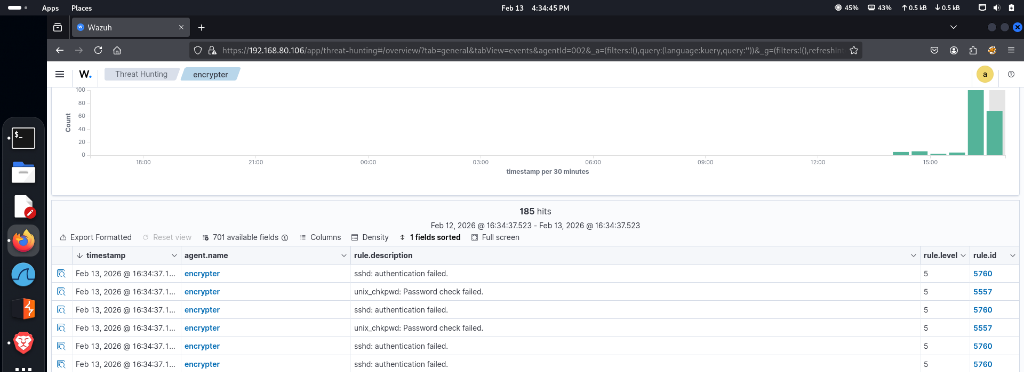
Looking closely at the ingested telemetry stream, you can observe the defense escalation in action:
- Rule 5760 / 5716 (Level 5):
sshd: authentication failed.— Triggers for each individual incorrect password submitted by Hydra. - Rule 5557 (Level 5):
unix_chkpwd: Password check failed.— Ingested from PAM subsystem failures during credential verification. - Rule 5710 (Level 5):
Attempt to login using a non-existent user— Triggers when Hydra attempts credentials with usernames not present on the host. - Rule 100500 (Level 12):
SSH brute force detected - 8 failures in 60 seconds from same IP— Our custom correlation rule in action! As soon as the 8th failure occurred within 60 seconds, Wazuh correlated the events, elevated the severity to Level 12, and tagged the alert with MITRE ATT&CK T1110.
🎯 Testing & Validation Summary
To ensure your detection pipeline works flawlessly from end to end:
- Verify Log Ingestion: Run
tail -f /var/log/auth.logon the target machine while Hydra is running. You will see real-time failed authentication entries recording the attacker's IP and attempted username. - Verify Correlation Engine: Confirm that Rule
100500fires in the Wazuh Dashboard. If only baseline Level 5 alerts appear, double-check/var/ossec/etc/rules/local_rules.xmlfor syntax errors using/var/ossec/bin/wazuh-analysisd -tand ensurewazuh-managerwas restarted. - Analyze Alert Payload: Expand the JSON payload of the Rule
100500alert. You can inspect:data.srcip: Attacker IP address (Kali VM).data.dstport: Targeted port (22).rule.mitre.id:T1110(Brute Force).rule.mitre.tactic:Credential Access.
| Metric / Field | Detail |
|---|---|
| **MITRE ATT&CK ID** | [T1110 - Brute Force](https://attack.mitre.org/techniques/T1110/) |
| **Tactic** | Credential Access |
| **Severity** | Level 12 (High) |
| **Trigger Condition** | 8 failed attempts within 60 seconds from identical `srcip` |
| **Target Service** | OpenSSH (`sshd`) on Port 22 |
Next Steps: Automated Mitigation with Active Response
Detecting the brute-force attack is step one for a SOC analyst. The logical next enhancement is automated threat containment.
Using Wazuh Active Response, you can configure the SIEM to automatically trigger a firewall drop command (via iptables, nftables, or firewalld) on the target machine the moment Rule 100500 fires. This blocks the attacker’s IP address at the network layer for a defined duration (e.g., 10 minutes or indefinitely), neutralizing the brute-force attack before credentials can be compromised.
Conclusion
In this lab, we successfully built and verified a complete SSH brute-force detection pipeline:
- Configured the Wazuh Agent to collect Linux authentication telemetry (
/var/log/auth.log). - Engineered a custom correlation rule (
Rule 100500) with time and frequency thresholds. - Mapped detection rules to the MITRE ATT&CK framework (T1110 - Credential Access).
- Executed an automated dictionary attack simulation using Hydra from Kali Linux.
- Triaged the resulting alert spikes and forensic evidence in the Wazuh SIEM Dashboard.
Hands-on exercises like this bridge the gap between red team simulation and blue team detection engineering.
Want to check out the project files or replicate this in your own lab?
Head over to my GitHub repository for the full details:
🔗 SSH Bruteforce Detection Using Wazuh SIEM
Other Digital Presences
- Buy Me a Coffee: buymeacoffee.com/jaseervk
- GitHub: github.com/jaseervk
- Portfolio: www.jaseervk.com
- Blog: blog.jaseervk.com
- LinkedIn: linkedin.com/in/jaseer-vk-
- Medium: https://medium.com/@jaseervk321